A simple shell.An entire life inside.

Everything you write, record, and refuse to lose. One place. Every device. Under your key.

100 notes free, forever. No card, no trial clock, and the export door is never locked.

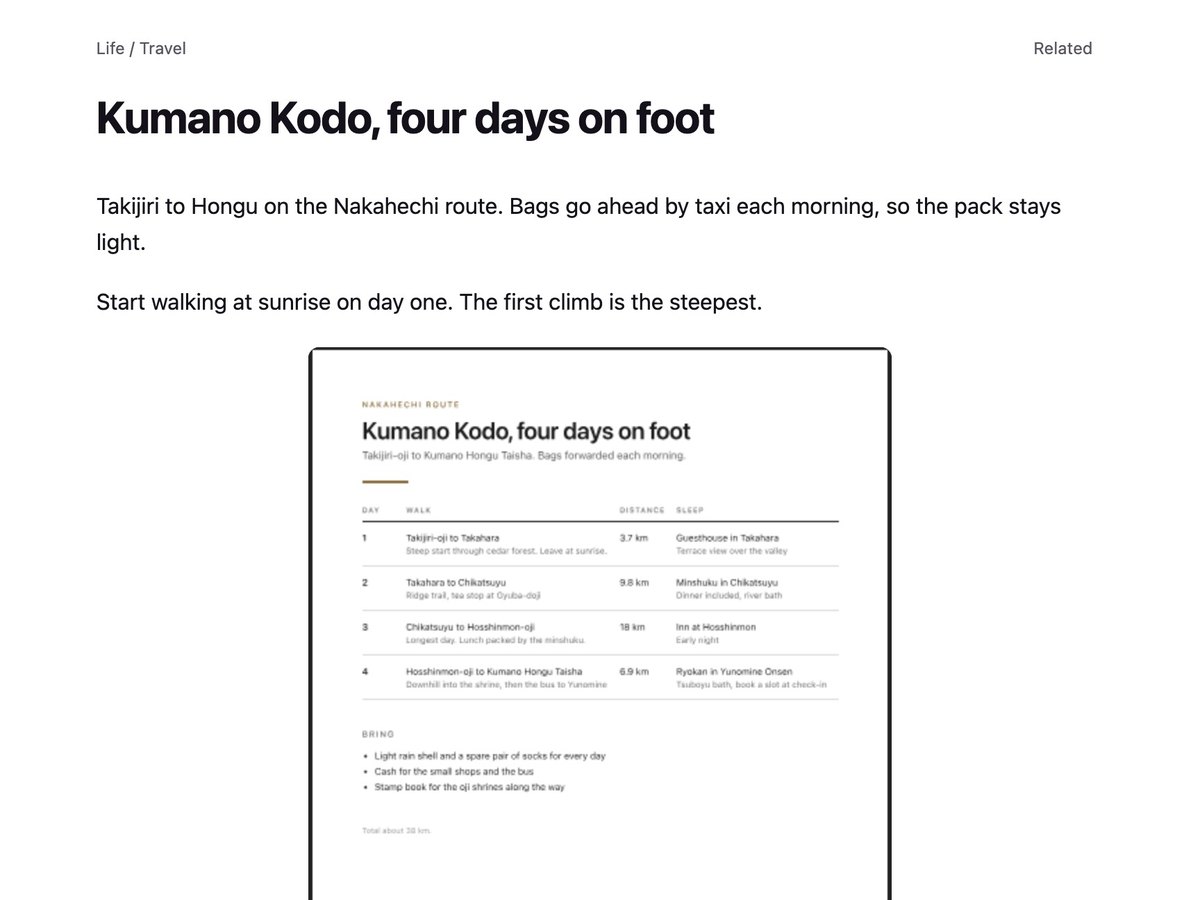
The Egg app: notebooks, tags and media shelves in the sidebar, Calendar and Graph views, a note list, and an open voice memo with its transcript

Knowledge graph

Your notes have more in common than you think.

A project, a place, an idea you keep coming back to. See the connections across your library through links, shared tags, notebooks, dates, and similar text. Open a note from the graph and pick up the thought where you left it.

Start with the library you already have. Connections are worked out on your device, with encrypted storage and HTTPS protecting your account.

Egg's knowledge graph connects a demo library of notes around notebooks and shared tags, with filters for links, time, and similar text
Your whole library, connected. Select any note to open it.

Calendar

Remember when. Find it again.

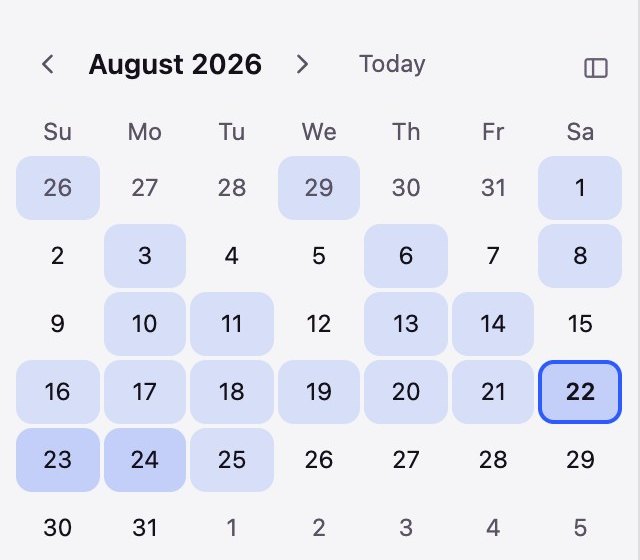
Sometimes you remember the day better than the title. Browse your notes on a calendar, see which days were busiest, and choose a date to bring that day's notes back into view. Search for a date or a month to jump straight there.

Egg's calendar shows August 2026 with shaded days, the notes created on August 22, including a Kyoto travel note
A calendar of your notes, with each day shaded by how much you wrote.

Fast

Three keystrokes to anything.

Press ⌘K and type. Egg answers before you finish the word. Titles rank first, then your own words, then the words inside your files, down to what was said in a recording. Typos forgiven, connection optional, because it is searching your device and not our server.

The command bar searching for the word induction, which appears only inside the transcript of a voice memo

Archive

Done, not deleted.

Some notes are finished, not disposable. Archive one and it leaves your list and your search results without leaving your account. Archive a notebook and everything inside it goes too. And when a search comes up empty, Egg counts the matches waiting in your archive and takes you to them in one keystroke.

Media

Embed PDFs, images, audio, and video.

Drag anything into a note and it stays there. PDFs read in place, images sit at full width, and audio and video play where you dropped them, so keep a file inline or leave it as a tile you click to open. Recordings transcribe in a tap and every word lands in search, so there is no need to scrub a timeline.

A Bosch dishwasher spec sheet rendered inside an Egg note, readable without downloading it
PDF, read in place
A photo of the Fushimi Inari torii gates embedded at full width in a Kyoto travel note
Image, full width
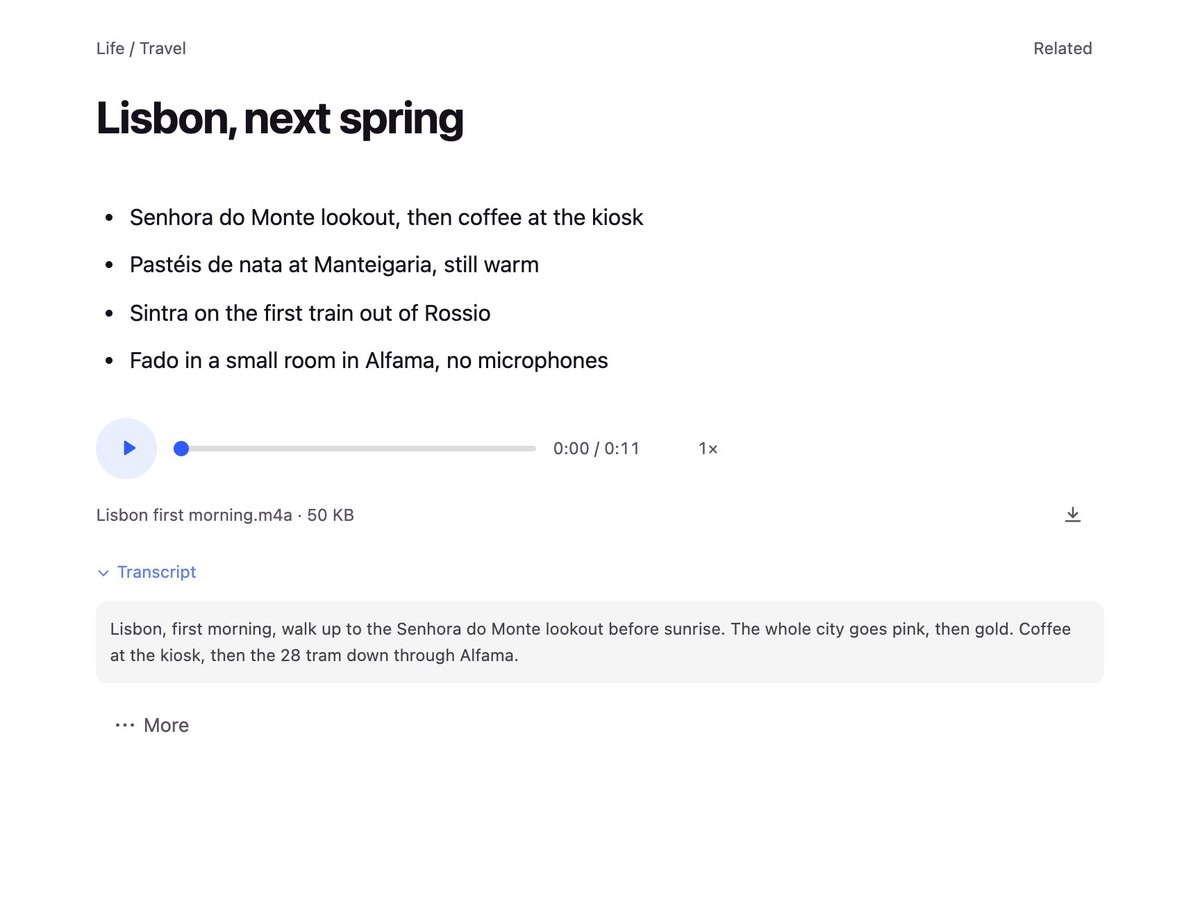
A voice memo in an Egg note: the inline player above its full searchable transcript
Audio, with transcript
A short video clip playing inline inside an Egg note
Video, playing inline

Sync

Online and offline. Sync instantly.

Your library lives on your device, so you can read on a plane, write in a tunnel, and search on a dead hotel network. Edits queue in order and land everywhere else the moment you have a signal again.

That is the indicator from the corner of the app, blown up. Almost every time you look at it, it says synced.

Security

Secure by default.

Your notes use HTTPS in transit and encrypted storage at rest. Egg keeps your data available to you with full export and offline reading across your devices.

Everywhere

One library. Every screen you own.

Native apps for iPhone, iPad, and Mac, plus a full web app that runs in any browser and installs to the home screen or the dock. Real windows, real menus, real offline. Write on the phone and it is on the Mac before you sit down, and one subscription covers all of them.

Egg's native Mac app: sidebar, note list, and an open voice memo
The same voice memo open in Egg's iPhone app

Assistants

An MCP endpoint, built in.

Integrate with Claude, ChatGPT, or your choice of open model LLM for easy searching, reading, and drafting. Approve it with your own Egg login, revoke it from the same screen.

Egg's AI connections settings: a connector URL to paste into Claude, and the steps to approve it

Ownership

Easy come, easy go.

Effortless import, effortless export. Leave anytime you want.

One-click export

Everything you own as a portable archive. Notes, files, notebooks, tags, trash and all, readable without us.

Nothing watching

No trackers in the notes app and no third-party analytics. This public site measures visits only if you allow it.

A second lock, free

Passkeys with Face ID, Touch ID, or your device PIN, or an authenticator app. Both plans, every device.

No hostages

Hit any limit and everything you wrote stays readable, searchable, and exportable. A limit gates what you add next, never what you own.

Switching?

Twelve years of Evernote.Verified byte for byte.

The importer rebuilds your library exactly as you had it, down to the notebooks, tags, notes, and every attachment. Each file is hashed after upload and checked against the original, and if one byte is off the import stops and names the file. Google Keep, Simplenote, and Markdown folders come in the same door.

0
Notes verified
0
Files verified
0
Lost

# result: everything arrived. nothing lost.

And about the pricing over there. Their own table puts an asterisk on the word unlimited.

Evernote Free Evernote Starter Evernote Advanced Egg Free Egg Cracked
Price per year$0$99$249.99$0$39
Notes501,000Unlimited*100Unlimited
Notebooks120Unlimited*UnlimitedUnlimited
Devices13Unlimited*UnlimitedUnlimited
Tags20100Unlimited*UnlimitedUnlimited
EncryptionSelected text†Selected text†Selected text†Encrypted storage + HTTPSEncrypted storage + HTTPS
Hit a limit, lose access?YesYesYesNeverNever

* Their asterisk, not ours: "with the exception of safeguard limits applied to ensure performance and prevent abuse." † Evernote's note encryption covers highlighted text inside a note, on Mac and Windows only. Egg uses encrypted storage and HTTPS for every account. Evernote plan limits and US pricing from evernote.com, checked August 6, 2026.

Hi, I'm Paul.

Paul and his cat Egg

That's Egg. He is the reason this app has a name.

I, like you, loved the simplicity of Evernote's original app. But we're a long way from those days, and Evernote has become an expensive, bloated piece of software that has forgotten the basics of note keeping. So I built this app for myself.

As I was finishing it, still without a name, my 19 year old cat named Egg, the last of four, was diagnosed with squamous cell carcinoma. Faced with his mortality and my own inability to name an app, lightning struck. Egg is the perfect name, because what is an egg but a shell that protects a whole life inside?

Paul

Free, or $39 a year.

Free
$0

The whole app. A ceiling on how much you keep.

  • 100 notes
  • Unlimited notebooks and tags
  • Every device, always in sync
  • 1 GB of attachments
  • Encrypted storage, passkeys, and 2FA
  • Knowledge graph and calendar
  • Search, offline, and inline media
  • Full export, always
Start free
Cracked
$39 / year

The ceiling comes off.

  • Unlimited notes
  • 10 GB of attachments
  • Audio transcription
  • Full-library import from Evernote and beyond
  • One purchase, every device you own
Get Cracked

One price. No seats, no upsells, no per-feature tiers, and no introductory rate that quietly doubles. Invite a friend and you earn a free month when they join.

FAQ

Does my Evernote import work with the knowledge graph?

Yes. The graph finds connections from your notes, notebooks, tags, dates, and similar text, so you can explore an imported library without linking every note by hand. You can also add links between notes yourself. The graph is built on your device and works with encrypted storage.

What does the calendar show?

The calendar shows notes by the day they were created. Shaded days tell you where there are notes, and selecting a day shows its notes. You can also search for a date or month and open it in the calendar.

I have thousands of notes and years of files. Will everything make it?

Yes, and you won't have to take our word for it. The importer verifies every note and every attachment after upload, byte for byte, and shows you the full report. If anything can't be proven identical, the import stops and tells you exactly which file. It has moved twelve-year libraries without losing a thing.

Which devices does Egg run on?

iPhone, iPad, and Mac have native apps, built from one codebase so they stay in step with each other. Everything else, Windows and Android and Linux included, runs the web app in any modern browser, and it installs to the home screen or the dock like an app. Your account works on all of them at once, on both plans, with no device limit.

Where do I get the iPhone, iPad, and Mac apps?

Visit Get Egg for native downloads and current availability for iPhone, iPad, and Mac. You can also use Egg in your browser. Sign in with the same Egg account to sync your notes.

Is there a web clipper?

Not yet. It's the next thing on the list after launch.

What is the difference between archiving and deleting?

Deleting puts a note in the trash on its way out. Archiving keeps it indefinitely but takes it out of your list and out of your everyday search, so your working set stays the notes you are actually working on. Nothing archived is any less exportable, and it comes back the moment you look for it.

Can you read my notes?

Egg uses encrypted storage and HTTPS for every account. Your notes remain available to you with full export and offline reading.

How does the MCP connection work?

Paste Egg's connector URL into Claude, ChatGPT, or any client that speaks MCP, then approve it with your own Egg login. The assistant can search, read, and write your notes, and it shows up in settings where one click revokes it. Nothing is connected by default and nothing trains on your notes. An account uses encrypted storage and can use the connection.

What happens to my notes if Egg shuts down?

You export them with one click, because the export door was never locked in the first place. Your archive is portable and readable without us. That is the point.

What happens when I hit the 100-note limit on Free?

You can't add note 101 until you upgrade, and that is the only thing that changes. Every note you've written stays readable, searchable, and exportable, forever. We don't take hostages.

Bring your notes home.

Create your account

Private by design: no trackers in the notes app, and public-site analytics only with your permission. Notes are yours to keep: one click exports everything as a portable archive. Offline-capable: your notes are readable on an airplane, in a tunnel, anywhere.